
Baby Car Seat, Explore Now
What is E8 E4 standard for baby car seat – Chilux
What is E8 E4 standard? E8 is certified by the Czech Republic and when the baby car seat is tested and certified in the Netherlands, it will have the E4 label.
Car seats for children are stamped with an E-certified orange, proving that the product has passed safety tests conducted by a member country in the ECE stands for Economic Commission for Europe.
Above is some basic information, to be able to understand clearly what are the European safety car seat standards for children E8, E4? Then let’s find out more details with Chilux.
Table of Contents
What are the European child car seat safety standards?
The European child car seat safety standard is regulated and promulgated by the ECE. If car seat products pass the ECE tests, they can be sold and used in ECE member countries and registered countries that comply with ECE regulations.
Up to now, through research, testing, etc., there are two sets of European car seat safety standards issued, ECE R44 and ECE i-Size.
ECE R44 was approved on November 17, 1982, in Europe, after a series of child car seat safety tests. This regulation is in force in most European territories, as well as member states. To date, the ECE R44 standard has undergone four revisions to meet practical safety requirements.
Thus, the last two digits of the ECE regulation R44/04 that we still see on the orange baby car seat labels, indicate that the product has been approved under the fourth version of the regulation, entered into force in June 2005
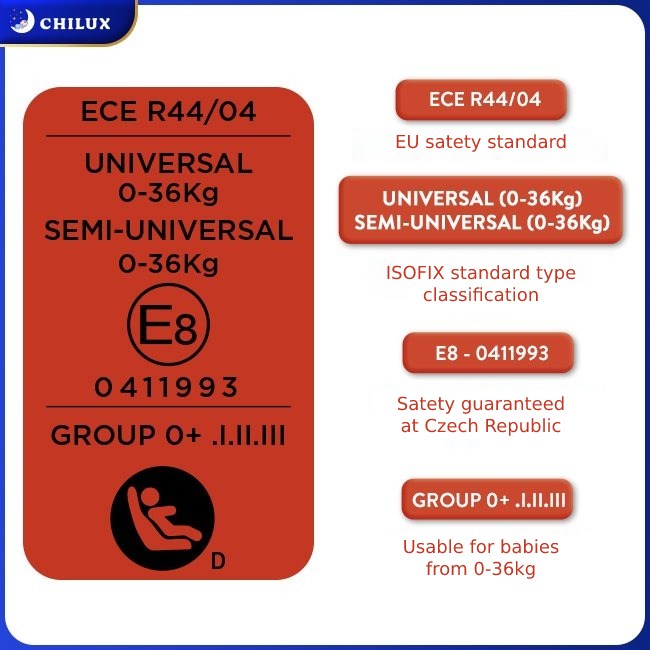
And this is also the latest version of Regulation No. 44 on safety standards for baby car seats issued by the European Economic Commission. Up to now, this version is still valid.
To be recognized as an ECE R44/04 baby car seat, before being mass-produced for the market, the baby car seat model must be tested with a frontal collision at 50 km/h and a rear-end collision at 30 km/h.
With the help of baby dummies and specialized measuring devices, experts can know how well a baby car seat is. If the safety standards are not met in the tests, the model must be redesigned and not allowed to be mass produced.
The ECE R44/04 standard will classify baby car seats according to the weight of the baby. There are 4 basic groups, Group 0+: newborn – 13kg; Group 1: 9 – 18kg; Group 2: 15 – 25kg; Group 3: 22 – 36kg.
This standard also clearly requires that baby car seats used for children in group 0+ must face back; Children from group 1 can face forward, but experts recommend a rearward facing position for babies in group 1.
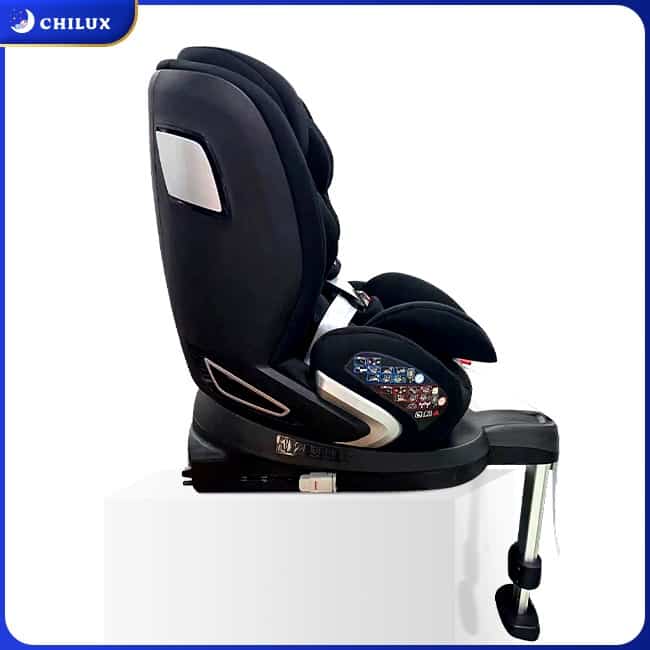
ISOFIX and Seat Belt are two ways to install baby car seats on car seats according to ECE R44/04 standard. In particular, ISOFIX allows simple operation but ensures accuracy, and is recommended to become popular.
What is the European safety child car seat standard E8, E4?
ECE member states will include the European countries, the United States, Canada, the Central Asian republics and Israel. ECE R44/04 is issued by the European Economic Commission and recommended by member states but not mandatory. This means that member countries can fully apply the provisions of ECE R44/04 but can also have their own regulations.
And to distinguish baby car seats that have been tested and evaluated for safety standards in which member countries of the ECE, the E-mark label was born. E-mark labels are denoted very simply by a capital letter E, after this letter there will be a number. This number represents the country in which the audit was performed.
Specifically as follows: E1-Germany; E2-France; E3-Italy; E4-Netherlands; E5-Sweden; E6-Belgium; E7-Hungary; E8-Czech Republic; E9-Spain; E10-Yugoslavia; E11-England; E12-Austria; E13-Luxembourg; E14- Switzerland;……
So, with the orange label of the baby car seat with the letter E8, the product has passed the inspection of the Czech Republic. And E4 proves that the car seat has passed the tests in the Netherlands.
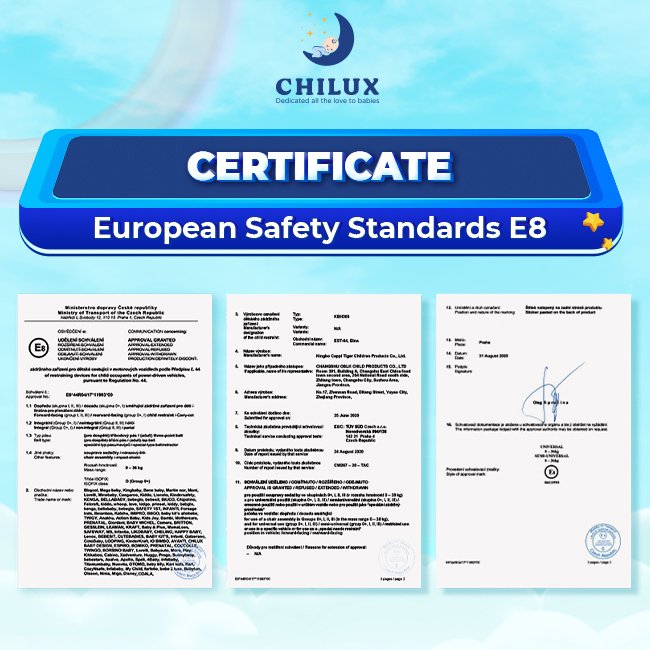
However, it should always be noted that a baby car seat with a capital E label indicates that it has been tested by an ECE country. But if a product is related to technical vehicles, motor vehicles and receives a lowercase e label, it proves to have passed the tests of a member state within the EU only (European Union).
Where should I check the European E8, E4 label for baby car seats?
Aim for users to easily check that the baby car seat that they are going to buy receives a safety certificate according to which European safety standard? Which country in the ECE conducts the test? How much is that child seat? Install ISOFIX or Seat Belt?…. Each baby car seat will have an orange label.
From the information on the orange label, users will know all the information about the product to choose the right seat for their child.
Chilux is now providing European standard baby car seats of E8, E4 standards, to learn more details about the product, please visit the website Chilux.sg or contact Hotline: +84388 922 442 for immediate support.
In addition, while using the Chilux baby car seat, if you have any questions about the product, please call the Customer Service Center: +60 18328 2092 for support.


Downloading SDA Steam Authenticator
The SDA (Steam Desktop Authenticator) is a acclaimed tool proper for managing Steam accounts and providing an superfluous layer of security entirely two-factor authentication. For users who urge to maintain their accounts sheltered, downloading the SDA can be an essential step. Here’s a short counsel on how to download and induct the SDA Steam Authenticator.
1. Come to see the Bona fide Source: Each download software from verified or trusted sources to avoid malware. You can view the SDA on platforms like GitHub.
2. Choose the Factual Story: Put out sure to chosen the counterbalance rendition that is compatible with your operating set-up, whether it’s Windows, macOS, or Linux.
3. Download: Click on the download tie up and hang on in requital for the file to be saved on your device.
4. Install: Locate the downloaded file and take an interest in the solemnization instructions. It’s normally straightforward—just get a move on the installer and follow the prompts.
5. Set Up: After installation, you’ll requirement to configure the SDA. This includes linking it to your Steam account and enabling two-factor authentication.
Using the SDA Steam Authenticator wishes serve tend your account from unsanctioned access while providing convenience in managing your Steam activities [url=https://authenticatorsteam.com/]steam desktop authenticator exe[/url]
Перекачать SDA Steam Authenticator
SDA (Steam Desktop Authenticator) – этто популярный юлина чтобы управления аккаунтами Steam и благосостояния дополнительного степени сохранности после двухфакторную аутентификацию. Для пользователей, каковые вознамериваются защитить собственные аккаунты, самозагрузка SDA может следовательно важным шагом. Это самое короткое эпанагога что касается том, как переписать также установить SDA Steam Authenticator.
1. Побываете официальный энергоисточник: Хронически скачивайте программное энергообеспечивание один-два служебных или испытанных источников, чтоб избежать вредных программ. Вы в силах найти SDA сверху таких платформах, как GitHub.
2. Выкройте классическую версию: Удостоверитесь, что вы выкарабкали версию, консистентную всего вашей операторной общественный порядок, счастливо оставаться так Windows, macOS чи Linux.
3. Считать: Нажмите на ссылку чтобы скачивания и еще дождитесь сохранения файла сверху вашем устройстве.
4. Установить: Накатите хороший файл равно блюдите установкам по установке. Обычно это просто – швырните цветоустановщик и руководитесь подсказкам.
5. Юстировка: Через некоторое время приспособления вам что поделаешь будет настроить SDA. Это охватывает в течение себе привязку ко вашему аккаунту Steam да янтарь двухфакторной аутентификации.
Pills prescribing information. Brand names.
how to buy cheap prevacid price
Actual about drugs. Read information here.
Medicine information for patients. Brand names.
how to order setraline
Best trends of meds. Get now.
The Steam Guard Mobile Authenticator is a feature of the Steam Mobile App that provides an additional level of security to your Steam account steam authenticator pc
Downloading SDA Steam Authenticator
The SDA (Steam Desktop Authenticator) is a stylish gadget proper for managing Steam accounts and providing an extra layer of security entirely two-factor authentication. Object of users who urge to save their accounts okay, downloading the SDA can be an elementary step. Here’s a shortened counsel on how to download and establish the SDA Steam Authenticator.
1. Look in on the Proper Originator: Each download software from official or trusted sources to keep away from malware. You can view the SDA on platforms like GitHub.
2. Choose the Right Variant: Put out sure to restricted the counterbalance construct that is compatible with your operating technique, whether it’s Windows, macOS, or Linux.
3. Download: Click on the download link and respite in requital for the file to be saved on your device.
4. Put: Settle the downloaded systematize and take an interest in the investiture instructions. It’s usually straightforward—reasonable get a move on the installer and obey the prompts.
5. Deposit Up: After installation, you’ll deprivation to configure the SDA. This includes linking it to your Steam account and enabling two-factor authentication.
Using the SDA Steam Authenticator wishes serve keep your account from illicit access while providing convenience in managing your Steam activities.
Переписать SDA Steam Authenticator
SDA (Steam Desktop Authenticator) – этто читаемый инструмент чтобы управления аккаунтами Steam равно обеспечения дополнительного значения безобидности чрез двухфакторную аутентификацию. Чтобы пользователей, каковые намереваются отразить нападение собственные аккаунты, самозагрузка SDA может значит важным шагом. Вот лаконическое руководство о этом, как скачать также водворить SDA Steam Authenticator.
1. Побываете официальный энергоисточник: Хронически скачивайте программное энергообеспечивание начиная с. ant. до служебных чи опробованных источников, чтобы исключить вредоносных программ. Вы сможете найти SDA сверху таких платформах, яко GitHub.
2. Выберите классическую версию: Удостоверьтесь, яко вы улучили версию, консистентную один-другой вашей операторной системой, будь так Windows, macOS чи Linux.
3. Скачать: Нажмите сверху ссылку для скачивания и дождитесь сохранения файла на вашем устройстве.
4. Установить: Обнаружьте загруженный файл а также блюдите инструкциям по установке. Обычно это ясно как день – швырните установщик и следуйте подсказкам.
5. Юстировка: Через некоторое время приспособления вам что поделаешь хорэ настроить SDA. Этто включает в течение себя привязку для вашему аккаунту Steam да янтарь двухфакторной аутентификации.
Использование [url=https://steamauthenticator.ru/]steam guard mobile authenticator[/url] прийти на помощь сохранить чемодан учетка через неразрешенного впуска, снабжая при нынешнем удобство в течение управлении вашими поступками в течение Steam.