
Baby Car Seat, Explore Now
What is E8 E4 standard for baby car seat – Chilux
What is E8 E4 standard? E8 is certified by the Czech Republic and when the baby car seat is tested and certified in the Netherlands, it will have the E4 label.
Car seats for children are stamped with an E-certified orange, proving that the product has passed safety tests conducted by a member country in the ECE stands for Economic Commission for Europe.
Above is some basic information, to be able to understand clearly what are the European safety car seat standards for children E8, E4? Then let’s find out more details with Chilux.
Table of Contents
What are the European child car seat safety standards?
The European child car seat safety standard is regulated and promulgated by the ECE. If car seat products pass the ECE tests, they can be sold and used in ECE member countries and registered countries that comply with ECE regulations.
Up to now, through research, testing, etc., there are two sets of European car seat safety standards issued, ECE R44 and ECE i-Size.
ECE R44 was approved on November 17, 1982, in Europe, after a series of child car seat safety tests. This regulation is in force in most European territories, as well as member states. To date, the ECE R44 standard has undergone four revisions to meet practical safety requirements.
Thus, the last two digits of the ECE regulation R44/04 that we still see on the orange baby car seat labels, indicate that the product has been approved under the fourth version of the regulation, entered into force in June 2005
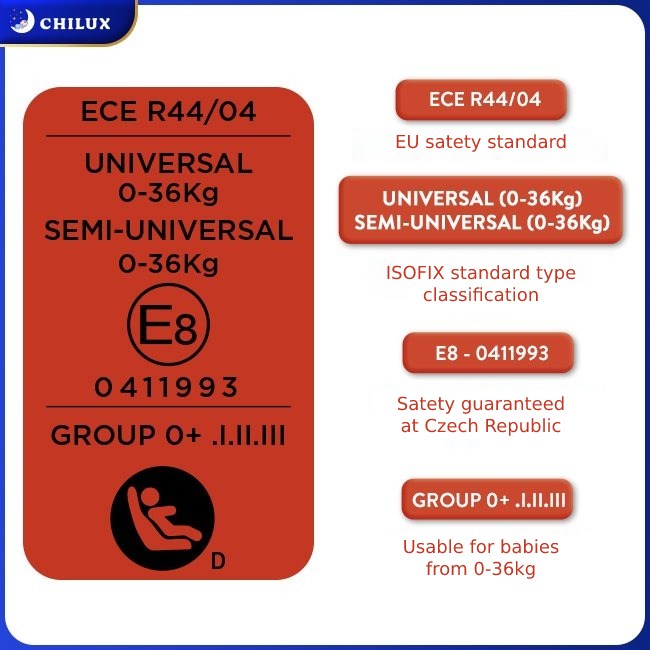
And this is also the latest version of Regulation No. 44 on safety standards for baby car seats issued by the European Economic Commission. Up to now, this version is still valid.
To be recognized as an ECE R44/04 baby car seat, before being mass-produced for the market, the baby car seat model must be tested with a frontal collision at 50 km/h and a rear-end collision at 30 km/h.
With the help of baby dummies and specialized measuring devices, experts can know how well a baby car seat is. If the safety standards are not met in the tests, the model must be redesigned and not allowed to be mass produced.
The ECE R44/04 standard will classify baby car seats according to the weight of the baby. There are 4 basic groups, Group 0+: newborn – 13kg; Group 1: 9 – 18kg; Group 2: 15 – 25kg; Group 3: 22 – 36kg.
This standard also clearly requires that baby car seats used for children in group 0+ must face back; Children from group 1 can face forward, but experts recommend a rearward facing position for babies in group 1.
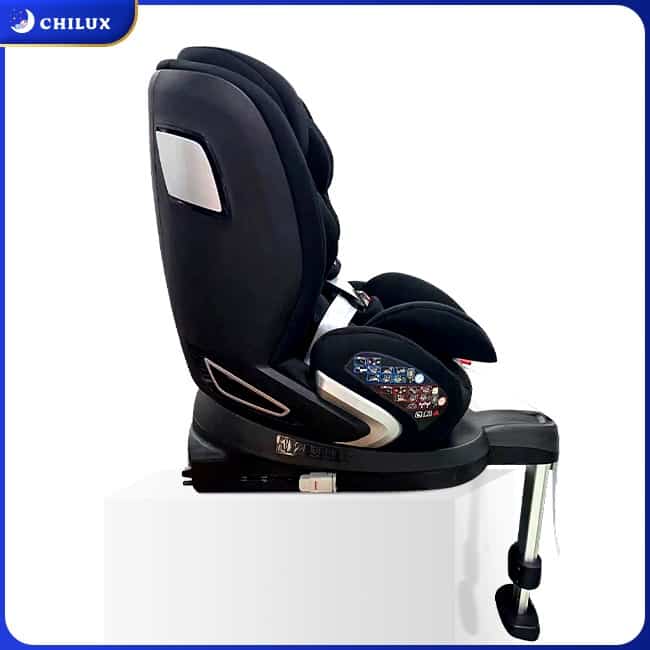
ISOFIX and Seat Belt are two ways to install baby car seats on car seats according to ECE R44/04 standard. In particular, ISOFIX allows simple operation but ensures accuracy, and is recommended to become popular.
What is the European safety child car seat standard E8, E4?
ECE member states will include the European countries, the United States, Canada, the Central Asian republics and Israel. ECE R44/04 is issued by the European Economic Commission and recommended by member states but not mandatory. This means that member countries can fully apply the provisions of ECE R44/04 but can also have their own regulations.
And to distinguish baby car seats that have been tested and evaluated for safety standards in which member countries of the ECE, the E-mark label was born. E-mark labels are denoted very simply by a capital letter E, after this letter there will be a number. This number represents the country in which the audit was performed.
Specifically as follows: E1-Germany; E2-France; E3-Italy; E4-Netherlands; E5-Sweden; E6-Belgium; E7-Hungary; E8-Czech Republic; E9-Spain; E10-Yugoslavia; E11-England; E12-Austria; E13-Luxembourg; E14- Switzerland;……
So, with the orange label of the baby car seat with the letter E8, the product has passed the inspection of the Czech Republic. And E4 proves that the car seat has passed the tests in the Netherlands.
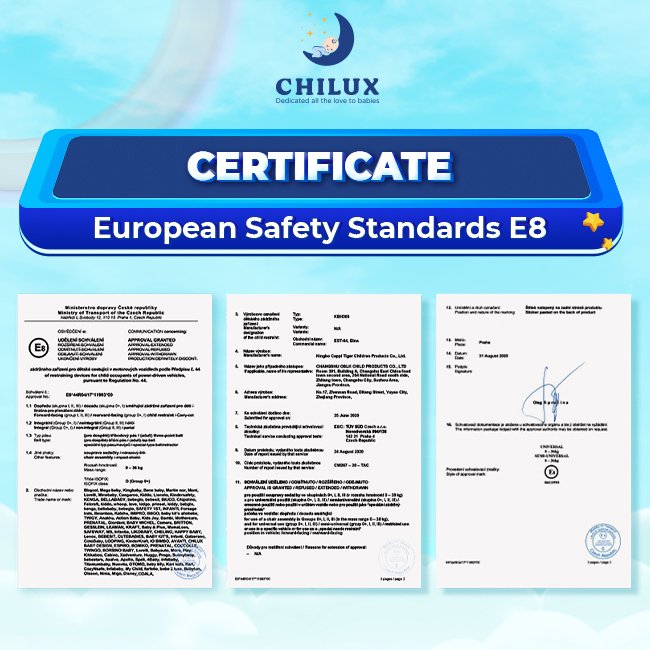
However, it should always be noted that a baby car seat with a capital E label indicates that it has been tested by an ECE country. But if a product is related to technical vehicles, motor vehicles and receives a lowercase e label, it proves to have passed the tests of a member state within the EU only (European Union).
Where should I check the European E8, E4 label for baby car seats?
Aim for users to easily check that the baby car seat that they are going to buy receives a safety certificate according to which European safety standard? Which country in the ECE conducts the test? How much is that child seat? Install ISOFIX or Seat Belt?…. Each baby car seat will have an orange label.
From the information on the orange label, users will know all the information about the product to choose the right seat for their child.
Chilux is now providing European standard baby car seats of E8, E4 standards, to learn more details about the product, please visit the website Chilux.sg or contact Hotline: +84388 922 442 for immediate support.
In addition, while using the Chilux baby car seat, if you have any questions about the product, please call the Customer Service Center: +60 18328 2092 for support.


Steam Desktop Authenticator (SDA) это программа, которая подсобляет пользователям Steam защищать свои аккаунты с помощью двухфакторной аутентификации (2FA). данный инструмент предоставляет дополнительный уровень безопасности, генерируя временные коды, которые нужны для входа в аккаунт.
Установка и Настройка
1. Скачивание: Первым шагом вам нужно загрузить Steam Desktop Authenticator с официального репозитория GitHub. Найдите раздел “Releases” и выберите последнюю версию для загрузки.
2. Установка: После загрузки распакуйте архив в удобное вам место на компьютере. Программка не просит сложной установки, вы можете запускать её непосредственно из распакованной папки.
3. Настройка: При первом запуске программа попросит вас ввести данные вашего учетной записи Steam. Удостоверьтесь, что у вас включен Steam Guard, так как прибавленье будет запрашивать файл конфигурации, который Steam генерирует для аутентификации.
Внедрение
– После опции SDA будет генерировать уникальные коды, которые обновляются каждые 30 секунд. Эти коды необходимо будет вводить при входе в аккаунт Steam или при подтверждении операций, требующих дополнительной безопасности.
– Прибавление нового аккаунта: вы сможете добавить несколько учетных записей в SDA, что полезно для тех, у кого есть несколько профилей в Steam.
Преимущества
– Безопасность: Использование [url=https://steamauthenticatordesktop.com/]steam desktop authenticator гитхаб[/url] значительно увеличивает уровень безопасности вашего аккаунта, оберегая его от несанкционированного доступа.
– Удобство: В отличие от мобильного приложения, вы можете использовать SDA прямо у вас на компьютере.
Заключение
Steam Desktop Authenticator это мощный инструмент для улучшения безопасности вашего аккаунта Steam. Регулярное использование двухфакторной аутентификации поможет защитить ваши данные и предупредить несанкционированный доступ. Всегда следите за обновлениями программки на GitHub, чтобы быть в курсе заключительных изменений и улучшений!
how to get sildalist price
I strongly recommend this site for ordering sildenafil
Order sildenafil without prescription
I blog quite often and I really appreciate
your content. This great article has truly peaked my interest.
I will take a note of your blog and keep checking for new
details about once per week. I opted in for
your RSS feed too.
Steam Desktop Authenticator (SDA) is a application that assists Steam users protect their accounts with two-factor authentication (2FA). This tool provides an extra layer of security by generating temporary codes that are needed to log into your account.
Installation and Setup
1. Download: The first step is that you must download Steam Desktop Authenticator from the official GitHub repository. Find the “Releases” section and choose the final version to download.
2. Installation: Once downloaded, unzip the archive to a comfortable your computer location. the little program does not require complicated installation, you will be able to run it specifically from the unzipped folder.
3. Setup: When you first run the program, it will ask you to enter your Steam account details. Make sure that you have Steam Guard enabled, since the add will ask for a configuration file that Steam generates for authentication.
Usage
– After option, [url=https://githab.net/Jessecar96/SteamDesktopAuthenticator/]download steam desktop authenticator[/url] will generate unique codes that are updated every 30 seconds. These codes must be entered when logging into your Steam account or when proving transactions that require additional security.
– Adding a new account: You will be able to add multiple accounts to SDA, which is useful for those who have multiple Steam profiles.
Benefits
– Security: Using SDA significantly increases the security level of your account, protecting it from unauthorized access.
– Convenience: Unlike a mobile app, you will be able to use SDA directly on your computer.
Conclusion
Steam Desktop Authenticator is a powerful tool for improving the security of your Steam user account. Regular implementation of two-factor authentication will help protect your data and warn unauthorized access. Always watch the software updates on GitHub to stay up to date with the latest changes and improvements!